How to Structure Your Notion Fitness Database for the Best Analytics
Updated: April 3, 2026
NotionStats can generate fitness analytics like training volume trends, exercise frequency, top weights, estimated 1RM progress, cardio trends, and body metric tracking — as long as your Notion databases have the right columns.
If you want to skip setup, you can duplicate my ready-to-use Notion Fitness template and customize it.
Database Schema (Copy This) #
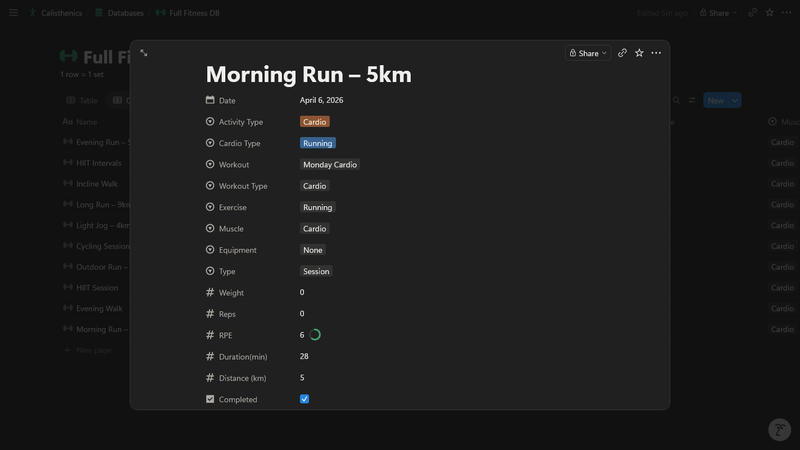
Workout Log (recommended) #
Create one Notion database named Workout Database with:
- Required
- Date: Date
- Exercise: Select
- Weight: Number
- Reps: Number
- Muscle Group: Select
- Equipment: Select
- Recommended
- RPE: Number (1–10)
- Split: Select (Push/Pull/Legs/etc.)
- Duration: Number (minutes)
- Volume: Number (or Formula returning number)
- Activity Type: Select (Strength / Cardio)
- Distance: Number (kilometers)
- Cardio Type: Select (Run/Cycle/Row/Walk/etc.)
For the best results with cardio templates and milestones:
- Keep Duration in minutes and Distance in kilometers.
- Mark cardio rows with Activity Type = Cardio.
- For strength rows, keep using your existing Weight/Reps/Volume fields and set Activity Type = Strength.

Body Metrics (optional, but supported) #
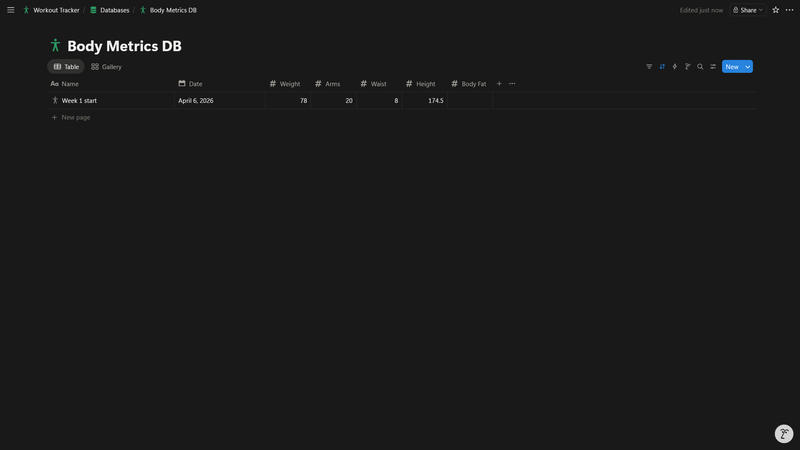
Create a second Notion database named Body Metrics Database with:
- Date: Date
- One or more metric columns as Number:
- Weight, Waist, Arms, Body Fat, Height, etc.
If you’re new to NotionStats setup, start here: Guide to adding analytics to your Notion.
Troubleshooting / FAQ #
My volume charts are empty #
Make sure:
- Every workout row has a valid Date
- Your Volume column is numeric (Number or Formula returning number)
My “Exercise Frequency” chart is messy #
Use Exercise as a Select property and avoid near-duplicates (e.g., “Bench Press” vs “Benchpress”).
Estimated 1RM isn’t showing progression #
You need a numeric 1RM Estimate column (Number or Formula) and a valid Date. If you don’t store 1RM explicitly, NotionStats can still estimate it from Weight + Reps in some stats — but charts work best with an explicit 1RM column.