How to Structure Your Notion Finance Database for the Best Analytics
Updated: April 5, 2026
If you want clean finance analytics in NotionStats (income vs expense, spending by category, payment method breakdowns, and net worth over time), your Notion database needs a few key properties with the right types and conventions.
If you want to skip setup, you can duplicate my ready-to-use NotionFinance template and customize it.
Database Schema (Copy This) #
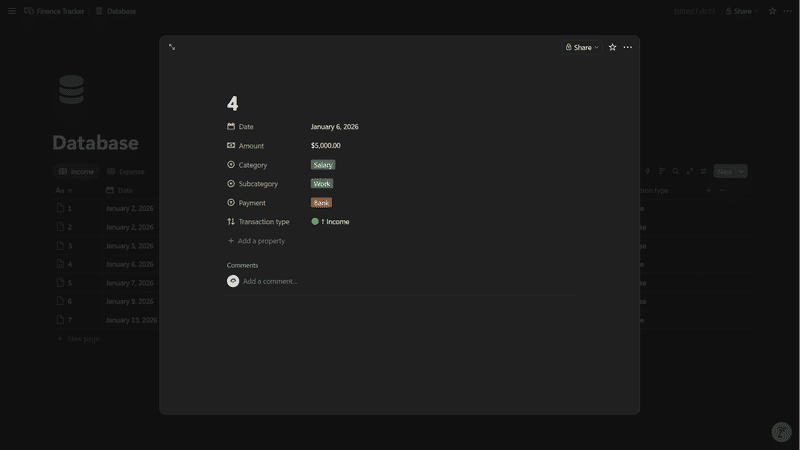
Create one Notion database named Finance Database and add these properties.
- Required
- Name: Title (optional, but nice for readability)
- Date: Date
- Amount: Number (positive for income, negative for expense)
- Recommended (for breakdown charts)
- Category: Select (e.g., Rent, Groceries, Salary, Subscriptions)
- Payment Type: Select (e.g., Cash, Debit, Credit Card, Bank Transfer)
- Subcategory: Select (optional, e.g., Groceries → Produce)
Data Entry Rules That Keep Analytics Accurate #
These are the most common reasons finance analytics look wrong.
- Keep Amount signed
- Don’t store expenses as positive numbers.
- Use Select for grouping fields
- Category/Payment Type/Subcategory should be Select to avoid typos creating “duplicate categories”.
If you’re new to NotionStats setup, start here: Guide to adding analytics to your Notion.
Troubleshooting / FAQ #
My income vs expense chart looks inverted #
Check Amount sign. Income must be positive and expenses must be negative.
Category charts are messy / duplicated #
Make sure Category is a Select property and you’re consistently using the same options.
Net worth over time has gaps #
Make sure every transaction row has a valid Date. Date-based charts can’t bucket rows without dates.