How to Structure Your Notion Habit Tracker Database for the Best Analytics
Updated: April 4, 2026
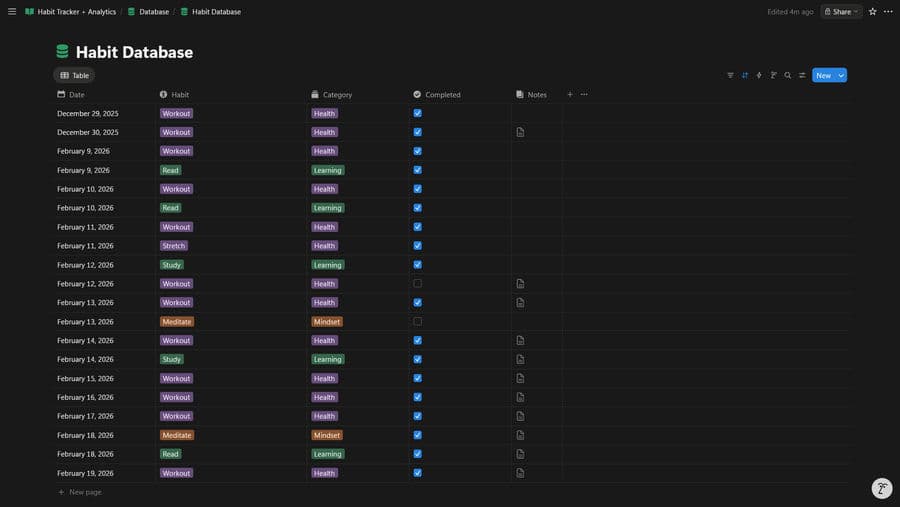
NotionStats can generate habit analytics like completion rate, current/longest streaks, and weekday completion patterns — as long as your habit tracker database has the right columns.
If you want to skip setup, you can duplicate my ready-to-use Notion Habit Tracker template and customize it.
Table of Contents
Database Schema (Copy This)
Create one Notion database named Habit Database and add these properties.
- Required
- Name: Title (optional, but nice for readability)
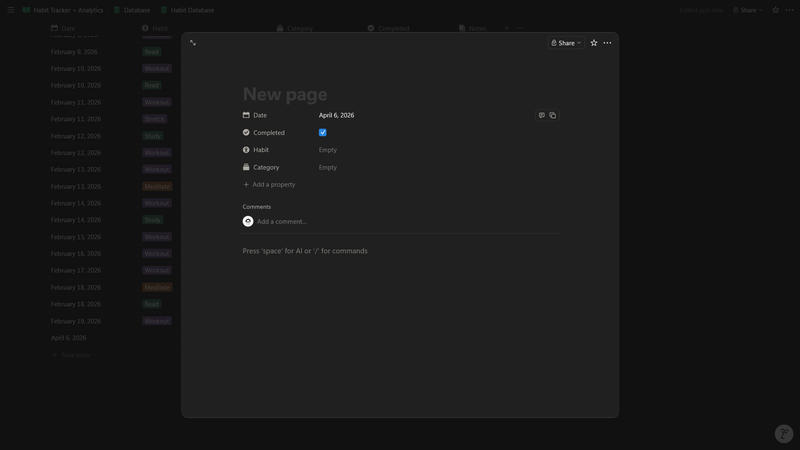
- Date: Date (when the habit was logged)
- Completed: Checkbox (completed or not)
- Recommended (for richer charts + filtering)
- Habit: Select (e.g., “Workout”, “Read”, “Meditate”)
- Category: Select (e.g., Health, Learning, Mindset)
Data Entry Rules That Keep Analytics Accurate
- Log consistently on the correct date
- Most habit analytics bucket by day; missing/incorrect dates can break streaks.
- Avoid duplicate habit names
- Use Select options rather than text so “Read” and “Reading” don’t become separate habits.
- Be intentional about “strict” vs “flexible”
- Some habit charts treat missing days as missed (strict), while others only consider days you logged (flexible).
- This is configured in NotionStats, but it depends on your data being date-driven.
If you’re new to NotionStats setup, start here: Guide to adding analytics to your Notion.
Troubleshooting / FAQ
My streak is always 0
Common causes:
- You’re missing Date values.
- Your Done checkbox is never checked.
- Your most recent completion is more than a day old (current streak resets).
Completion rate looks too low
If you’re using a strict mode chart, missing days between your first and last log can count as misses. Log daily (even if “Done” is unchecked) if you want strict analytics to reflect intention.
Suggested Posts

Step-by-Step Guide to Adding Custom Analytics to Notion with NotionStats
Learn how to enhance your Notion with powerful analytics using NotionStats. This guide walks you through creating custom charts and calendars, linking them to your Notion database, and tracking data visually for better insights and productivity.
Read more
How to Create Custom Charts in Your Notion: A Step-by-Step Guide
Follow this step-by-step guide to create and embed custom charts into your Notion pages...
Read more
How to Create and Track Milestones in Your Notion Workspace: A Step-by-Step Guide
Learn how to create, customize, and embed milestones in your Notion workspace. Track progress across finance, subscriptions, habits, fitness, and more with auto-updating goal displays.
Read more