How to Create and Track Milestones in Your Notion Workspace: A Step-by-Step Guide
Updated: April 6, 2026

Milestones are visual progress trackers that help you stay motivated and measure progress toward your goals. With NotionStats milestones, you can create beautiful, dynamic milestone widgets that update automatically from your Notion database—whether you're tracking subscriptions, finances, habits, fitness, trading, or any other template-backed database.
Table of Contents
- What Are Milestones?
- Step 1: Access the Milestone Page
- Step 2: Create Your First Milestone
- Step 3: Choose a Template
- Step 4: Save Your Milestone
- Step 5: Copy the Embed URL
- Step 6: Embed in Notion
- Troubleshooting
- Conclusion
What Are Milestones?
Milestones are visual progress trackers that help you celebrate achievements in any workflow. They’re especially useful when you have a metric that moves toward a target—like “workouts completed”, “habits done”, “subscriptions reduced”, “monthly spend”, or “net worth goal”. Milestones provide a simple, gamified way to stay motivated and focused.
Step 1: Access the Milestone Page
If you don't have an account, read this guide to set up your account and link your Notion database.
Once you've linked a Notion database, navigate to your Dashboard and click the Milestones link on your workspace card.

You'll be redirected to the Milestone Page.
Step 2: Create Your First Milestone
On the milestone page, click the "Add Milestone" button to open the milestone creation modal.
Step 2.1: Select Your Database
In the modal that appears:
- Workspace: Should already be selected (this is where your milestone will be stored).
- Notion Database: Choose the Notion database you want to track milestones for.
Click "Continue" to proceed to the milestone editor.

Step 3: Choose a Template
You'll now be in the milestone editor, which has three main sections: Templates, Settings, and Live Preview.
Simply click on any template to auto-fill all settings.

Customize the template if needed
If you prefer to create a custom milestone, expand the Settings section and configure the following:
Milestone Name: Enter a descriptive name for your milestone.
Description (Optional): Add context about what this milestone tracks.
Display Type: Select how you want your milestone to appear:
- Progress Bar - Linear progress display
- Circular Progress - Clean, focused circular indicator
Levels
Levels define the achievements you want to track. Each level needs:
- Name: Description of the achievement (e.g., "Target", "$1,000 Saved")
- Value: Numerical target for this level
- Color: Visual color for this level (use the color picker)
Step 4: Save Your Milestone
Once you're satisfied with your configuration, click the "Save" button at the bottom of the settings panel. The milestone will be saved, and an embed URL will be generated automatically. After saving, you'll be redirected back to the milestone page where your new milestone appears as a card.
Step 5: Copy the Embed URL
Click the Copy icon to copy the embed URL.

Step 6: Embed in Notion
Now, paste the embed URL into your Notion page:
- In Notion, type /embed
- Paste your milestone embed URL
- Press Enter
- Resize the embed as needed

Tips for Effective Milestone Tracking
1. Start with Achievable Goals
Don't set your first level too high. Start with an easily achievable target to build momentum and motivation.
2. Use Multiple Display Types
Create the same milestone with different display types to see which visualization motivates you most.
3. Combine Different Metrics
Track various aspects of your workflow:
- Finance: Net worth goal, savings goal, monthly spend cap, income target
- Subscriptions: Active subscription count, monthly recurring spend, renewals this month
- Habits: Completion streaks, weekly completion targets, “days done” goals
- Fitness: Workout count, weekly volume target, PR targets
- Trading: Trades logged, rule adherence targets, consistency targets
4. Share Your Achievements
Use the preview link to share your milestone achievements with friends, teammates, or accountability partners.
Why Use Milestones in Your Notion Workspace?
Motivation and Gamification
Milestones transform abstract goals into visual achievements, making tracking more engaging and rewarding.
Progress Visualization
See at a glance how far you've come and how close you are to your next savings goal.
Goal Setting
Breaking large goals into smaller milestones makes them more manageable and less overwhelming.
Achievement Celebration
Acknowledge your achievements along the way, not just the final destination.
Data-Driven Insights
Track multiple metrics simultaneously to understand progress across different parts of your system.
Troubleshooting
Milestone Not Showing Data
- Verify your Notion database has the required columns for the chosen milestone template (and that the mapped columns have the correct Notion property types)
- Check database permissions in your Notion integration
- Ensure the database ID is correct
Can't Create Milestone
- Check your subscription limits (free plan has limits)
- Verify your account and database are properly linked
Embed Not Loading in Notion
- Verify the milestone ID is correct in the URL
- Ensure your Notion integration is still connected
- Try refreshing the Notion page
- Check if the embed URL is complete and properly formatted
Upgrade for More Milestones
Free plan users have a limit on the number of milestones they can create. Upgrade to PRO for unlimited milestones and advanced features.
Conclusion
Creating milestones in your Notion workspace adds a powerful layer of motivation and progress tracking to any template you use. By following this guide, you can set up beautiful, auto-updating milestone trackers that celebrate your achievements and keep you focused on what matters.
Start creating your first milestone today and watch your progress come to life!
Ready to add milestones to your workspace? Sign up now and start tracking your goals!
Suggested Posts

Step-by-Step Guide to Adding Custom Analytics to Notion with NotionStats
Learn how to enhance your Notion with powerful analytics using NotionStats. This guide walks you through creating custom charts and calendars, linking them to your Notion database, and tracking data visually for better insights and productivity.
Read more
How to Create Custom Charts in Your Notion: A Step-by-Step Guide
Follow this step-by-step guide to create and embed custom charts into your Notion pages...
Read more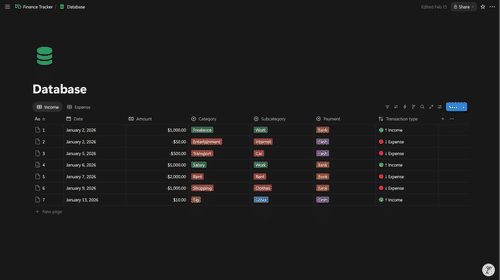
How to Structure Your Notion Finance Database for the Best Analytics
Set up a Notion Transactions database that unlocks accurate income/expense, net worth, and category analytics in NotionStats.
Read more